
How cloud storage powers consumer electronics in Europe 2026
Most people think cloud storage is just a digital attic where files collect dust. In reality, it’s the nervous system of your smart home ecosystem in 2026. Cloud storage now actively coordinates your smartphone, smart TV, wearables, and home devices, syncing data instantly and enabling features impossible with standalone gadgets. For European consumers navigating GDPR requirements and subscription fatigue, understanding how cloud storage integrates with your electronics determines privacy, performance, and cost. This guide reveals the technical mechanics, privacy considerations, and practical strategies to optimize cloud storage across your connected devices.
Table of Contents
- Understanding How Cloud Storage Integrates With Consumer Electronics
- Key Technologies And Syncing Mechanics Behind Cloud Storage
- Performance Considerations: Latency, Battery, And Hybrid Cloud Models
- Privacy, Regulatory Nuances, And Challenges For Multi-User Smart Homes In Europe
- Applying Cloud Storage Effectively With Your Consumer Electronics
- Explore The Best Consumer Electronics And Network Gear At OnlineStore24 EU
- Frequently Asked Questions
Key takeaways
| Point | Details |
|---|---|
| Synchronization foundation | Cloud storage enables instant data sharing between smartphones, TVs, wearables, and smart home devices |
| Technical protocols | SMB, FTP, WebDAV, and SFTP govern file transfers with varying latency and battery impact |
| Hybrid models | Combining local NAS with selective cloud syncing balances European privacy laws, cost, and accessibility |
| Multi-user privacy | GDPR compliance in shared homes requires data segmentation, filtering, and zero-knowledge encryption |
| Strategic choices | Storage decisions affect battery life, sync speed, and subscription costs across your device ecosystem |
Understanding how cloud storage integrates with consumer electronics
Cloud storage acts as a central sync engine for seamless data access across various devices, enabling active device ecosystems. Your smartphone photos appear on your smart TV without manual transfers. Fitness data from your smartwatch flows to your health dashboard on your laptop. Calendar events created on your tablet notify you through your smart speaker. This isn’t passive backup, it’s orchestration.
The shift from storage to coordination defines modern consumer electronics. When you adjust smart lighting preferences on your phone, those settings propagate to every device controlling your lights. Voice commands to one assistant update across all your smart home hubs. This integration supports electronics for modern European homes where devices must communicate constantly.
Consider these integration scenarios:
- Security camera footage accessible from any authorized device
- Music playlists syncing between phone, car system, and home speakers
- Shopping lists updated in real time across family members’ devices
- Smart thermostat learning patterns from multiple user inputs
“The cloud doesn’t just store your data anymore. It actively manages how your devices understand and respond to your lifestyle patterns, creating a truly responsive home environment.” - Smart Home Technology Review 2026
This ecosystem approach explains why cloud’s role in smart device ecosystems has become central to product design. Manufacturers build devices assuming constant cloud connectivity, not as an optional feature but as core functionality. Your electronics work together because cloud storage provides the common language and memory they share.
Key technologies and syncing mechanics behind cloud storage
Relevant protocols include SMB, FTP, WebDAV, and SFTP for file syncing, with local Wi-Fi enabling device-to-cloud transfer without internet. Each protocol offers different tradeoffs. SMB excels at network file sharing within your home. FTP provides simple transfers but lacks encryption. WebDAV enables collaborative editing. SFTP adds security layers for sensitive data.
Your devices execute syncing through a consistent process:
- Detect local changes to files, settings, or data
- Queue changes for upload during optimal network conditions
- Transfer modifications to cloud servers
- Notify other authorized devices of updates
- Download and apply changes across your ecosystem
This happens continuously in the background. When you snap a photo, your phone waits for Wi-Fi, uploads the image, and your tablet receives it within seconds. The smart home devices guide emphasizes choosing devices supporting multiple protocols for flexibility.

Local Wi-Fi direct transfers revolutionize syncing efficiency. Instead of routing through distant servers, devices on your home network communicate directly. Your phone uploads vacation videos to your NAS at local network speeds, then selective files sync to cloud storage for remote access. This reduces data usage and accelerates transfers.
Battery and network impact vary significantly. Aggressive syncing drains batteries faster but ensures immediate updates. Scheduled syncing preserves battery but creates delays. Smart syncing algorithms balance these factors by learning your usage patterns. Apps like FolderSync let you customize sync triggers, frequencies, and conditions.
Pro Tip: Configure devices to sync only on Wi-Fi and when charging overnight. This prevents battery drain and mobile data overages while ensuring your ecosystem updates daily without impacting daytime performance.
Performance considerations: latency, battery, and hybrid cloud models
Sync latency ranges from under 1 second (local P2P) to over 14 seconds (cellular cloud), with battery impact varying 1 to 2.8 times depending on method. These numbers matter when you’re waiting for a document to appear on your tablet or watching battery percentages plummet.
Latency directly affects user experience. Local peer-to-peer syncing feels instantaneous. Wi-Fi cloud syncing introduces 2 to 5 second delays. Cellular syncing can take 10 to 15 seconds, frustrating users expecting immediate access. For time-sensitive applications like smart home security alerts, these delays create real problems.
Battery consumption follows similar patterns. Background syncing via cellular networks can drain batteries 2.8 times faster than Wi-Fi syncing. Constant polling for updates consumes power even when no changes exist. Devices with inefficient sync implementations suffer worse battery life than similar models with optimized protocols.
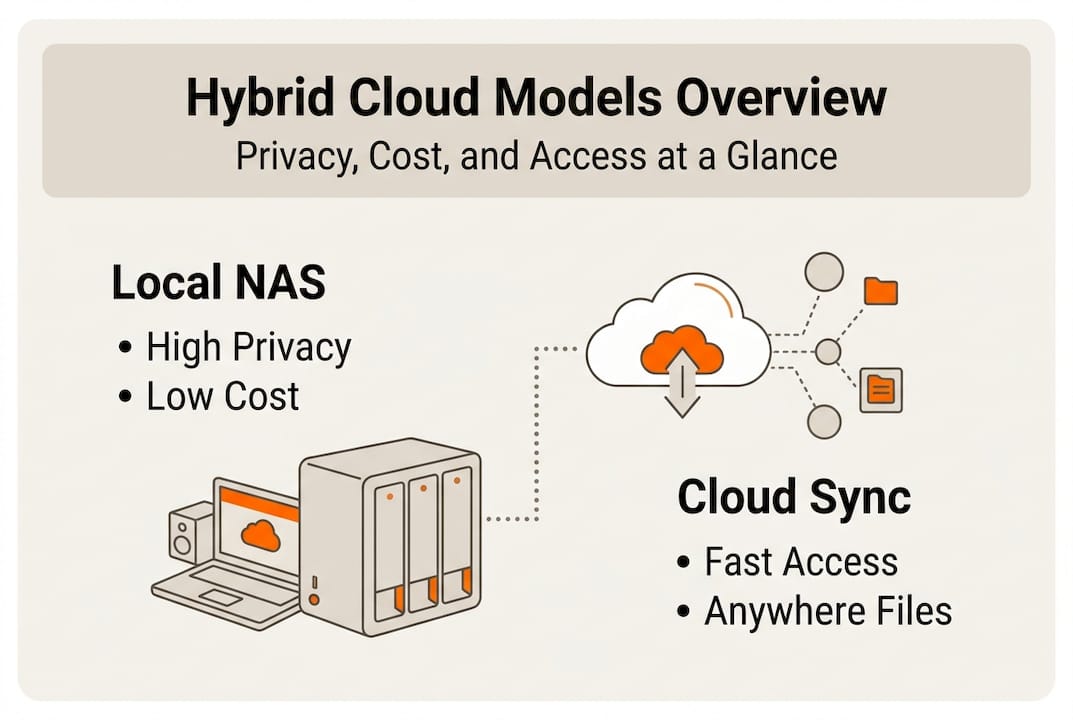
Hybrid NAS plus selective cloud sync balances privacy, cost, and access for EU users. Store bulk media files, backups, and archives on local network storage. Sync only essential files, recent photos, and active documents to cloud services. This approach reduces subscription costs while maintaining convenient remote access to important data.
Sovereign clouds address EU data residency and GDPR requirements by guaranteeing data stays within European borders. Services like OVHcloud, IONOS, and Hetzner provide cloud storage with servers exclusively in EU countries. This simplifies compliance for privacy-conscious consumers and businesses subject to strict data regulations.
| Storage Method | Latency | Battery Impact | Privacy | Cost |
|---|---|---|---|---|
| Pure Cloud | 2-14 sec | Medium-High | Moderate | Subscription |
| Local NAS | <1 sec | Low | High | Upfront |
| Hybrid Model | 1-5 sec | Low-Medium | High | Balanced |
The electronics buying guide Europe 2026 recommends evaluating total cost of ownership over five years. A €400 NAS with no monthly fees often costs less than €10 monthly cloud subscriptions totaling €600 over the same period, while offering superior privacy and performance for high-volume users.
Pro Tip: Calculate your actual monthly data generation. If you create over 100GB monthly from photos and videos, hybrid storage saves money within 18 months compared to pure cloud solutions at typical European pricing.
Privacy, regulatory nuances, and challenges for multi-user smart homes in Europe
Multi-user smart homes create mixed data sets conflicting with EU data laws, requiring segmentation, filtering, and zero-knowledge encryption as solutions. When your smart speaker records family conversations, whose data is it? When security cameras capture guests, how do you manage consent? These scenarios challenge GDPR compliance.
EU laws require strict data separation and user consent in smart homes. Each household member must control their personal data independently. Shared devices like smart TVs or voice assistants complicate this requirement. The Data Act further mandates that users can port their data between services and devices, creating technical challenges for manufacturers.
Practical privacy techniques include:
- Data segmentation creating separate storage zones per user
- User-specific filtering preventing cross-contamination of personal information
- Zero-knowledge encryption where even service providers cannot access your data
- Local processing keeping sensitive data on-device rather than uploading to cloud
Local storage complements cloud by keeping sensitive data private. Store financial documents, medical records, and personal communications on encrypted local drives. Use cloud only for non-sensitive files requiring remote access. This smart home privacy guidance approach minimizes exposure while maintaining convenience.
Zero-knowledge encryption for IoT ensures that data remains encrypted during transmission and storage, with decryption keys held only by end users. Even if cloud providers face data breaches or legal demands, encrypted data remains inaccessible without user keys. Services like Tresorit and Sync.com offer zero-knowledge architecture for European consumers.
| Feature | Pure Cloud | Local NAS | Hybrid |
|---|---|---|---|
| GDPR Compliance | Provider-dependent | Full user control | User-controlled |
| Data Residency | Varies by service | Guaranteed local | Mixed |
| Multi-user Separation | Limited | Configurable | Configurable |
| Encryption Control | Provider-managed | User-managed | User-managed |
| Breach Risk | Centralized target | Isolated | Reduced |
Multi-user households should implement user profiles with separate storage allocations. Modern NAS systems and cloud services support this natively. Each family member gets dedicated storage space with independent access controls. Shared spaces for family photos or documents use explicit permission settings rather than default sharing.
Applying cloud storage effectively with your consumer electronics
Hybrid local-cloud models provide the best balance of privacy, cost, and accessibility for European consumers with high data volume. Implementation requires strategic decisions about what data goes where and how devices sync across your ecosystem.
Hybrid storage uses NAS for heavy bulk files and cloud for instant access. Store your complete photo library on local NAS. Sync only the most recent 3 months to cloud for mobile access. Archive old videos locally while keeping current projects in cloud storage. This approach minimizes subscription costs while maintaining functionality.
Consider subscription fatigue and data lock-in with pure cloud services. Canceling a cloud subscription can mean losing access to years of data unless you download everything first. Multiple device subscriptions add up quickly. A smartphone backup plan, tablet sync service, and smart home cloud recording can total €30 to €50 monthly, while a one-time NAS investment provides unlimited storage.
Choose cloud services with EU data residency to meet legal requirements. Verify that providers store data exclusively on European servers. Check terms of service for data transfer policies and government access provisions. European providers often offer stronger privacy guarantees than global services subject to foreign jurisdiction.
Effective syncing strategies by data type:
- Photos: Auto-upload to NAS via Wi-Fi, selective cloud sync for recent images
- Videos: Local storage only, cloud links for sharing specific files
- Health data: Encrypted cloud with zero-knowledge providers
- Documents: Cloud sync for active projects, local archive for completed work
- Smart home logs: Local storage with cloud backup for critical security events
| Storage Approach | Best For | Pros | Cons |
|---|---|---|---|
| Pure Cloud | Light users, mobile-first | Easy setup, device-agnostic access | Ongoing costs, privacy concerns |
| NAS Only | Privacy-focused, high volume | One-time cost, full control | Requires technical setup, no remote access |
| Hybrid | Balanced needs, families | Cost-effective, flexible, private | Initial complexity, requires planning |
The electronics buying and storage guides recommend starting with hybrid approaches. Begin with a modest NAS for bulk storage and a small cloud plan for convenience. Adjust ratios based on actual usage patterns over 3 to 6 months. Most European households find 2TB local plus 200GB cloud sufficient.
Pro Tip: Use cloud storage for files you need across devices and locations. Use local storage for everything else. This simple rule optimizes costs and privacy without complex decision-making for every file.
Explore the best consumer electronics and network gear at OnlineStore24 EU
Ready to build your optimized smart home ecosystem? OnlineStore24 offers GDPR-compliant electronics ideal for European consumers navigating cloud storage decisions. Our catalog features smartphones, network equipment, and smart home devices designed for seamless connectivity and privacy.
Explore the Trendnet TEW-821DAP access point for robust home Wi-Fi supporting fast local syncing. Check out the Xiaomi Redmi A3X smartphone with expandable storage and cloud integration. Every product ships from EU warehouses with fast delivery across Europe, supporting your privacy-conscious tech adoption with reliable hardware and transparent pricing.
Frequently asked questions
What is the role of cloud storage in consumer electronics?
Cloud storage coordinates data synchronization across your device ecosystem, enabling smartphones, smart TVs, wearables, and home devices to share information instantly. It transforms isolated gadgets into an integrated system where changes on one device propagate automatically to all authorized devices.
What are the main syncing protocols used with consumer electronics?
SMB, FTP, WebDAV, and SFTP handle most consumer device syncing. SMB excels at local network file sharing, WebDAV enables collaborative editing, and SFTP provides encrypted transfers for sensitive data. Modern devices often support multiple protocols for flexibility.
How does hybrid cloud-local storage satisfy European privacy laws?
Hybrid models store sensitive personal data locally on user-controlled NAS devices while syncing only non-sensitive files to cloud services. This approach maintains GDPR compliance by keeping personal information within your control and on EU-based hardware, while preserving convenient remote access to selected files.
What impact does cloud syncing have on device battery life?
Cellular cloud syncing drains batteries up to 2.8 times faster than Wi-Fi syncing. Configuring devices to sync only on Wi-Fi and during charging periods eliminates this impact. Smart syncing algorithms that batch updates and avoid constant polling further reduce battery consumption.
Which storage option is best for high-volume video in European homes?
Hybrid storage combining local NAS for bulk video archives with selective cloud syncing for recent or important clips offers the best balance. This approach avoids expensive cloud subscription costs for terabytes of footage while maintaining convenient access to current content from any device.
Recommended
- Best Electronics for Modern Homes in Europe (2026 Guide) – OnlineStore24 EU
- Best Electronics for Modern Homes in Europe: Complete 2026 Buying Guide – OnlineStore24 EU
- Complete Electronics & Lifestyle Buying Guides for Europe 2026 – OnlineStore24 EU
- Smart Home Devices Guide 2026: Transform Your European Home – OnlineStore24 EU
- Role of Cloud in Smart Homes: Enhancing Automation